





Nail art · On your hand · Book directly

See it on your hand first.
Then book.

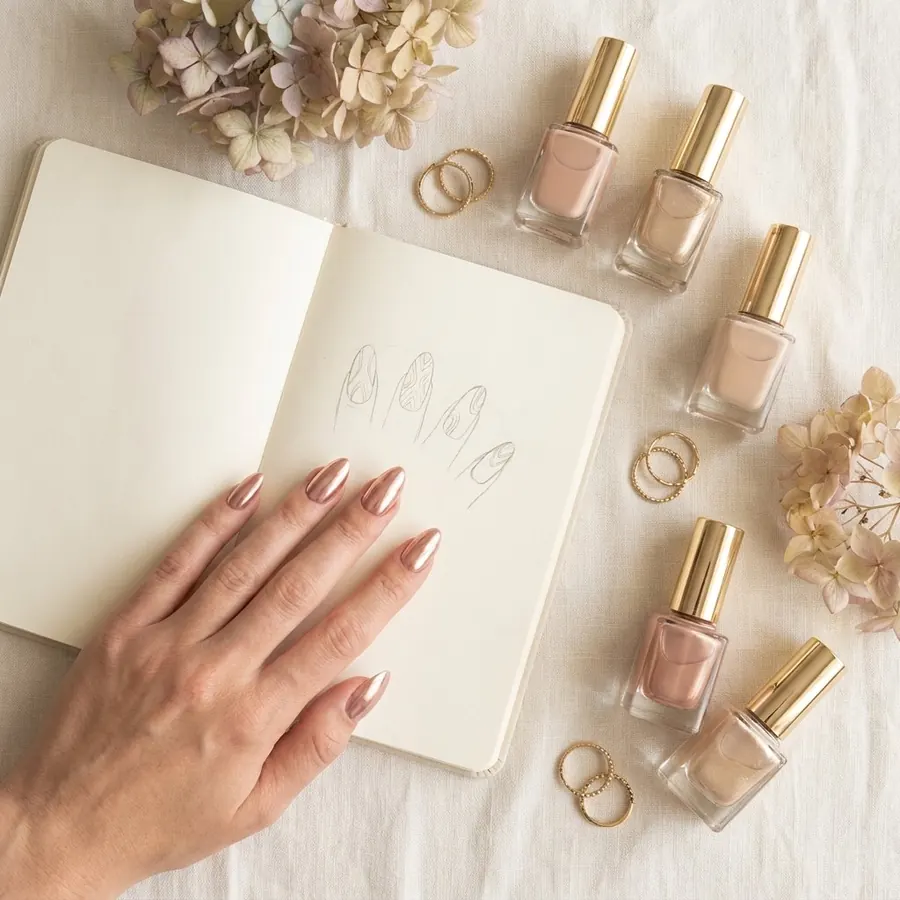
Take a photo of your hand, choose almond, coffin, stiletto or another shape and see the design on your own nails. Love it? Send it to a studio near you and book the next free slot.

Free to download · iOS & Android

Nail artist? Get booked online – free, no commission →
NailMe discover feed with nail art from studios nearby
Booking confirmedThu · 10:30 · Gel nails
AI design readyNude with gold flakes

What you do with NailMe

For clients and studios.

For nail studios, the app for bookings, regulars and invoicing – for clients, the fastest way from design to appointment.

You're looking for a nail studio

  1. Find inspiration

    Nail art from studios near you – and every design on your own hand with AI.

    Browse designs →
  2. Find the right studio

    Map, real reviews and all prices before you book.

    Studios nearby →
  3. Book in seconds

    Pick a free time, confirm, done – even without the app, in your browser. Reminder included.

    More about booking →
  4. Rebook and give as a gift

    Your next appointment with one tap, a waitlist for fully booked days, gift vouchers to give away.

Find studios near you

You run a studio

  1. Get booked online

    Clients book free slots around the clock – via your profile or the link in your Instagram bio.

    • Booking in the app and in the mobile browser
    • No commission, no fee per client
    • Appointments at your place or the client's
    More about the booking system →
  2. Fewer no-shows

    Reminders and deposits make sure booked appointments actually happen.

    • Reminder 24 and 2 hours before the appointment
    • Online deposit when booking
    • Waitlist fills cancelled slots
    More about reminders →
  3. Keep your regulars

    NailMe reminds clients automatically when it's time for a fill – and you see every client with her history.

    • Rebooking reminder per service
    • Recurring appointments, e.g. every 3 weeks
    • Client records with notes and photos per visit
    More about client records →
  4. Get seen

    Your designs show up in the feed, on the map and in search – each with a booking button.

    • Real reviews from real appointments
    • Ready-made stories and posts for Instagram
    • Your own profile page that Google finds
    More about social templates →
  5. Sell more

    Sell gift vouchers online and show designs with AI right on the client's hand.

    • Vouchers on your profile, redeemed with remaining balance
    • AI designs for your consultation
    • Forms, e.g. for allergies
    More about vouchers →
  6. Office work done

    Invoices, taxes and team – without a second program.

    • Invoices as PDF and e-invoice, payment reminders
    • Tax export incl. DATEV
    • Team board and time tracking
    More about invoices →
Start free as a studio

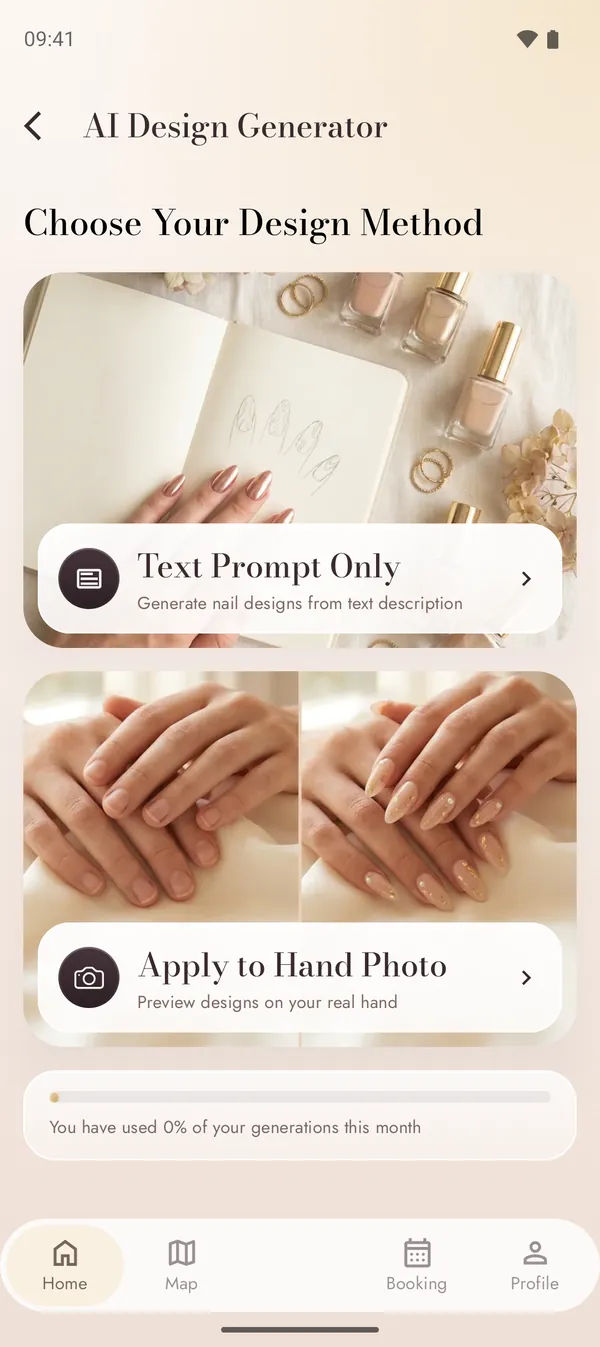
AI nail design

Dream it. See it on your own hand.

Not sure what you want? Describe your dream nails and NailMe’s AI creates unique designs in seconds – or upload a photo of your hand and preview a design on your real nails.

Text prompt

Pick a style and nail shape, describe your idea – get several designs to choose from.

Hand photo

Take a photo of your hand and see the design on your own nails before your appointment.

  • Style categories from minimalist to seasonal and chrome
  • Save your designs in your gallery or post them in the feed
  • Send a design to your artist so they know exactly what you want

Clients try the AI for free: 1 design without an account, 3 a month with an account. For professionals it is included in Pro and in the Group plan.

AI design generator with text prompt and hand photo mode
Your prompt“Milky nude, almond shape, gold flakes”

Nail shapes

The right shape for your hands

The shape decides how a design looks and how long it lasts. The seven shapes studios file most often – and who they suit.

  • Oval

    Classic and understated, makes short fingers look longer.

  • Round

    Low-maintenance and sturdy – ideal for short natural nails.

  • Square

    Straight edge with plenty of space for nail art, a little more fragile at the corners.

  • Squoval

    Square with soft corners – practical and strong.

  • Almond

    Slim towards the tip, visually lengthens the hand.

  • Stiletto

    Pointed and bold, needs length and gel or acrylic.

  • Coffin

    Long with a straight tip – the stage for chrome and ombré.

Not sure? With the AI try-on in NailMe you see every shape on your own hand before you book.

For clients

From inspiration to appointment

From a design in the feed to trying it on your hand to the appointment: you show the artist exactly what you want – no screenshot collections, no DMs.

  1. 01Discover a design
  2. 02Pick a studio
  3. 03Choose a free slot
  4. 04Confirm with one tap

Discover

A feed full of nail art near you

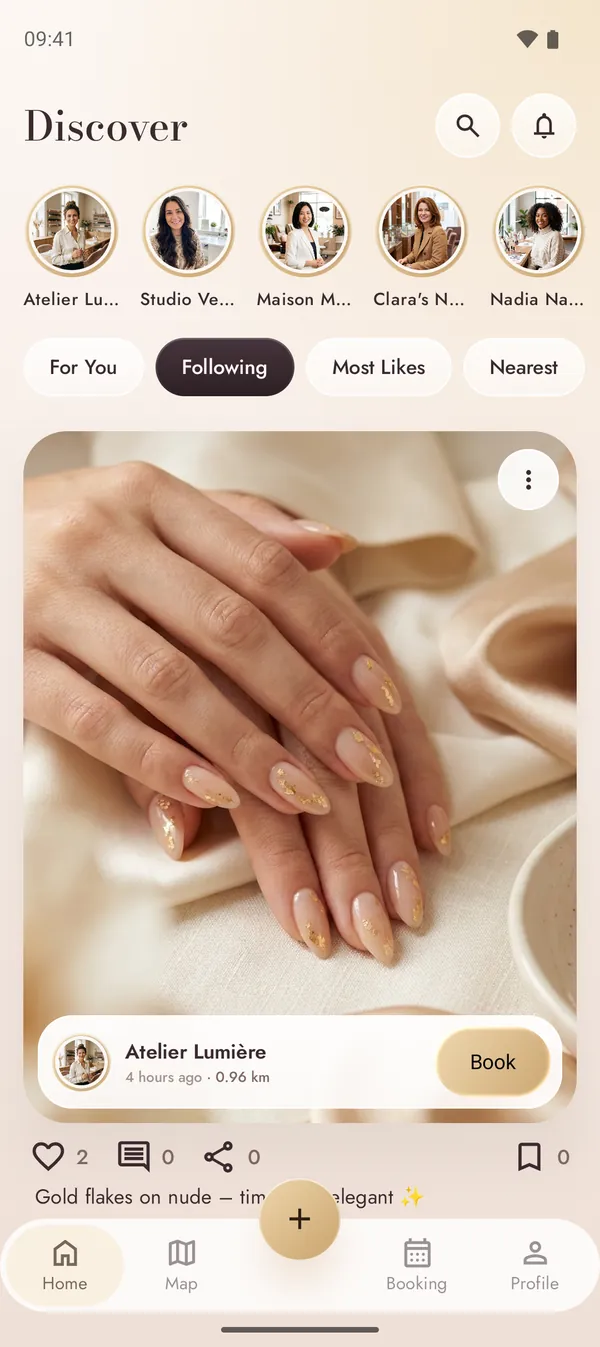
Swipe through fresh designs from nail studios and nail lovers. Every post shows who made it and how far away the studio is – and if you love it, you can book it right there.

  • Sort by For You, Following, Most Likes or Nearest
  • Follow artists and save designs to your collection
  • Tap “Book” right on a post you love
  • Not just nails: pedicure, foot care, lashes and brows – book it all at your studio

NailMe discover feed with nail art from studios nearby

Studio profiles

Real artists. Clear prices.

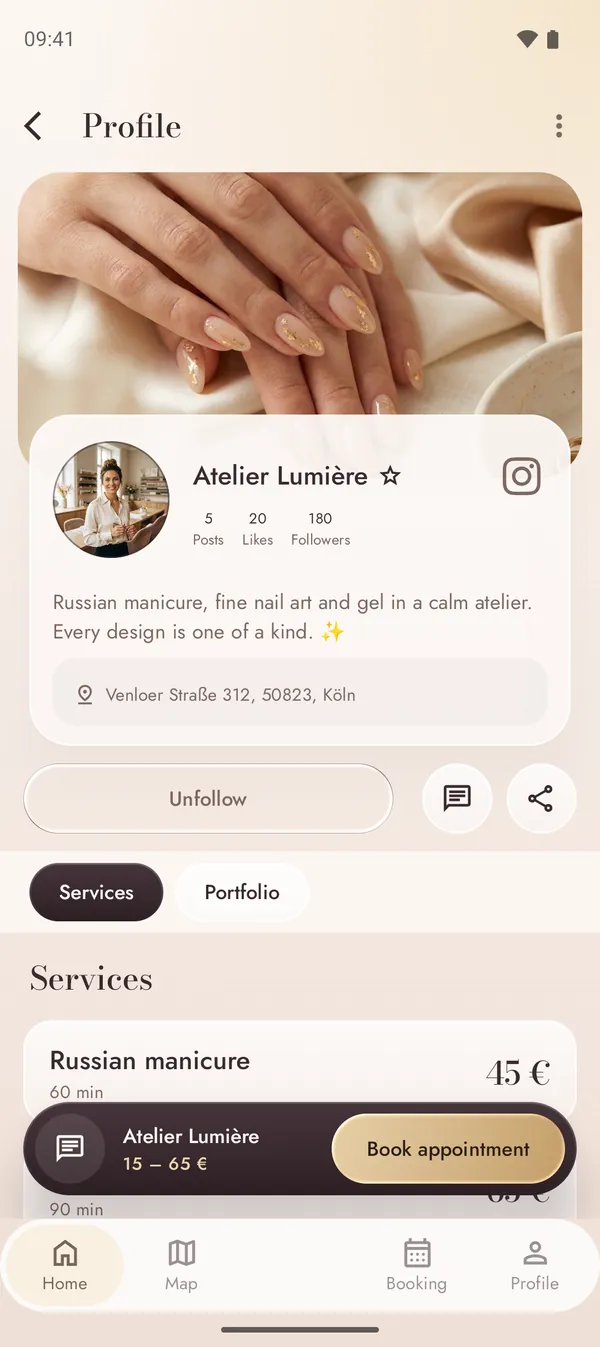
Every studio has its own profile with portfolio, address and a complete service list. You know what a treatment costs and how long it takes before you book.

  • Services by category with price and duration
  • Portfolio, bio, address and links to Instagram & TikTok
  • Follow, message or share a studio in one tap
Nail studio profile with services and prices

Near you

Studios around the corner

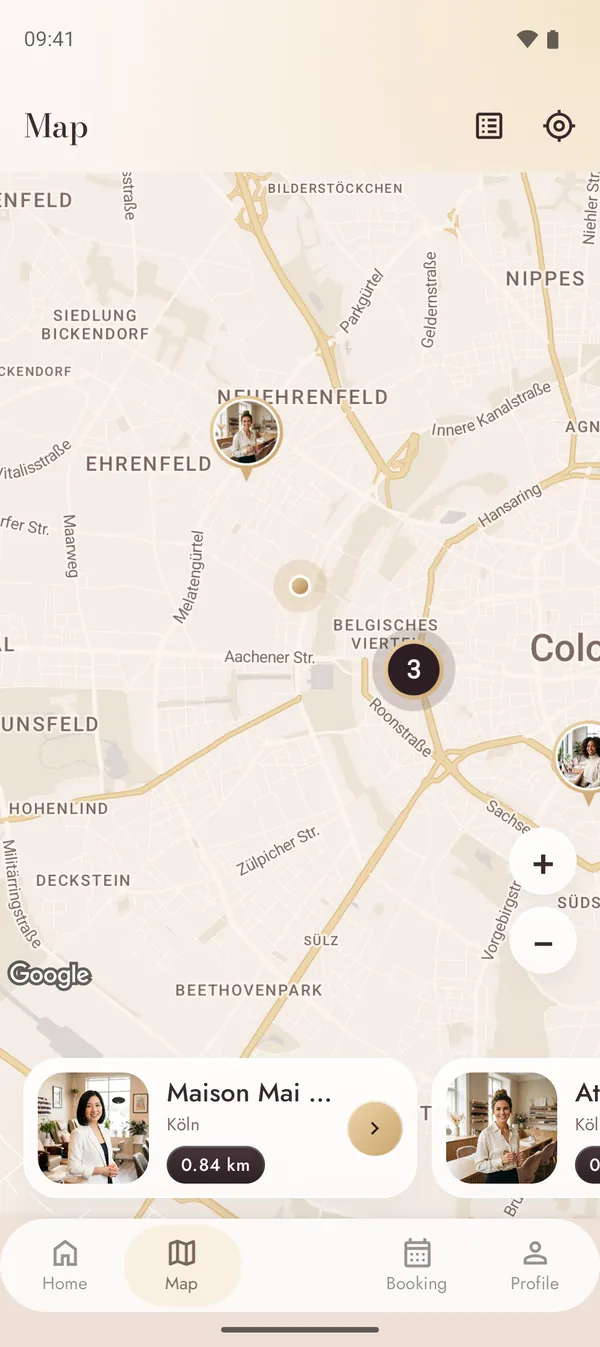
The map shows nail studios in your neighbourhood with their profile photos. Swipe through the studio cards below the map and see the distance at a glance.

  • Map with studio pins and distance
  • Search for artists, places, styles and tags
  • “Nearest” filter in the feed
Map with nail studios nearby

Booking

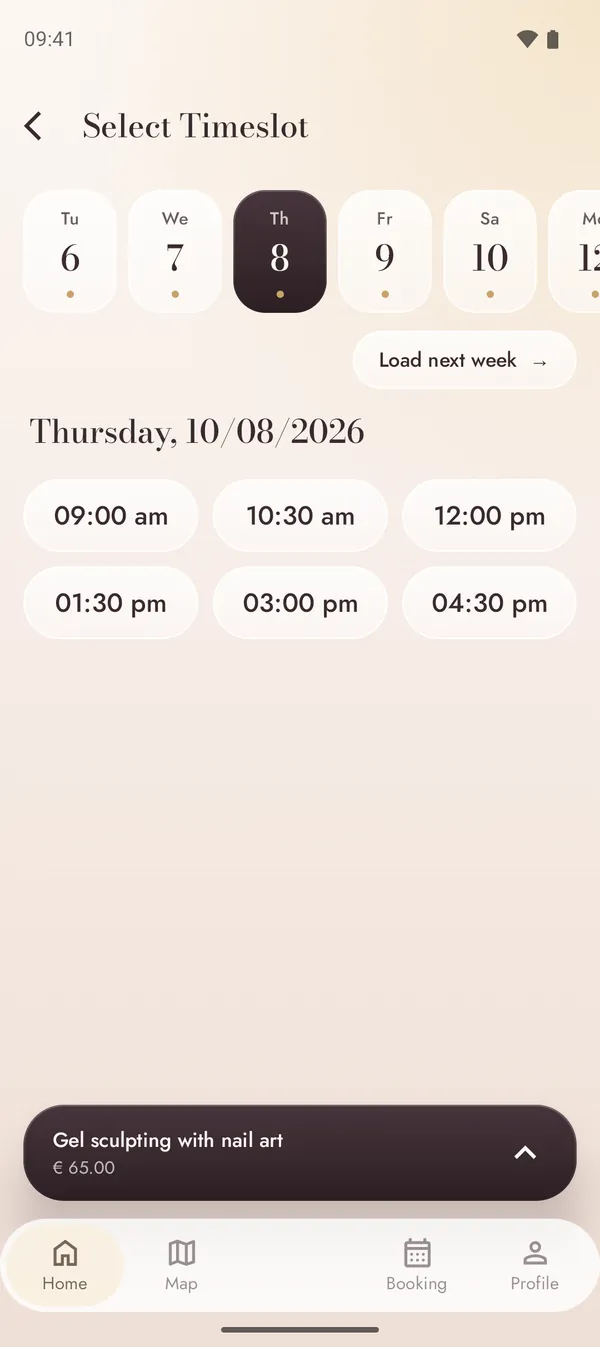
Pick a free slot, confirm with one tap

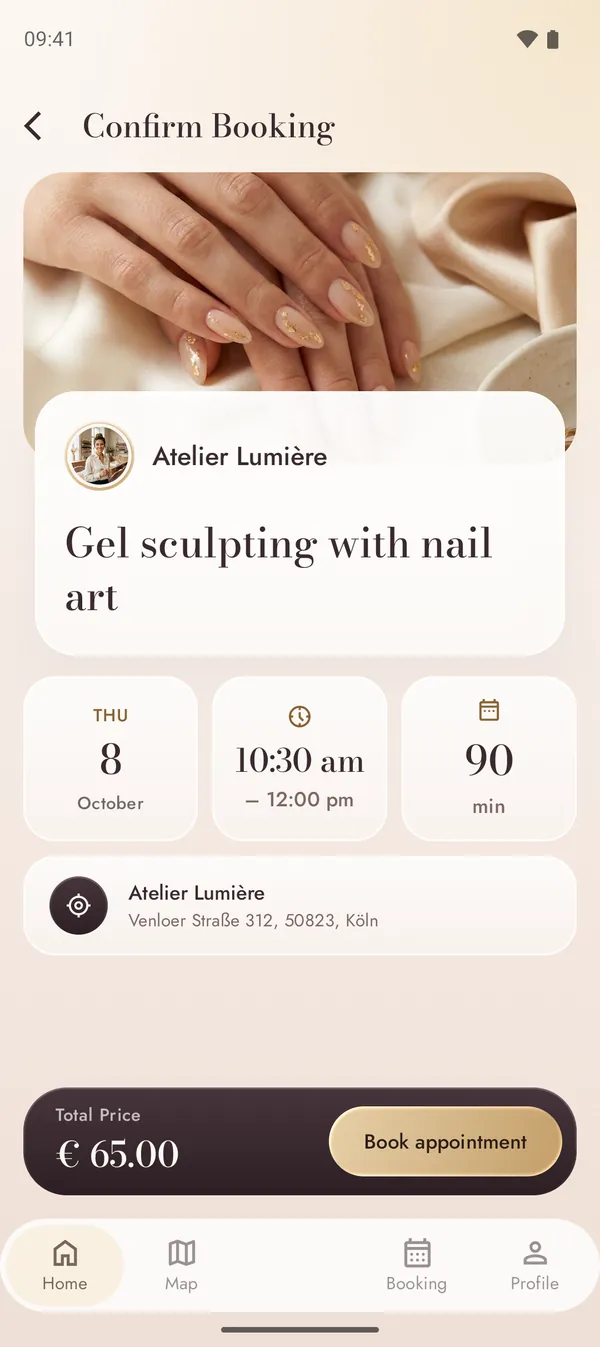
Choose a service, pick a day and see only the times that are really available. Before you confirm, you see everything that matters – date, time, duration, price and address.

  • Live availability from the artist’s calendar
  • Full summary before you confirm – no surprises
  • Instant confirmation or approval by the artist
  • Add the appointment to your phone’s calendar
Choosing a free time slot
Booking summary with date, duration and price

No app needed

Book right in your phone's browser

Don't want to install anything? Open the profile in your mobile browser, pick a service and a time and book with a free NailMe account – sign in with Google or your email. If you get the app later, your appointment is waiting for you there too.

Try a demo booking

At your place

Your artist comes to you

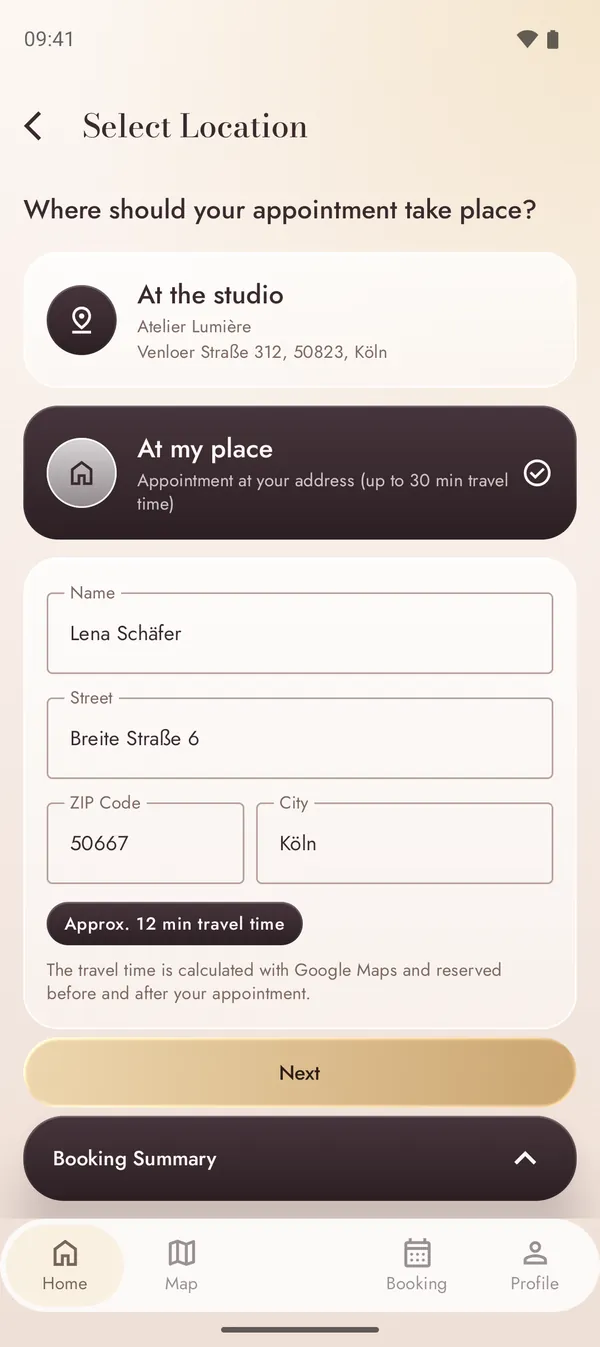
No time for the studio? Book an appointment at your home. Enter your address when booking – NailMe calculates the travel time and only shows times your artist can really make.

  • “At my place” right in the booking flow – your profile address is filled in
  • Travel time calculated automatically with Google Maps
  • Artists decide how far they travel – up to 90 minutes
More about on-site appointments
Booking an appointment at your address with the computed travel time

Chat

Share your ideas before the appointment

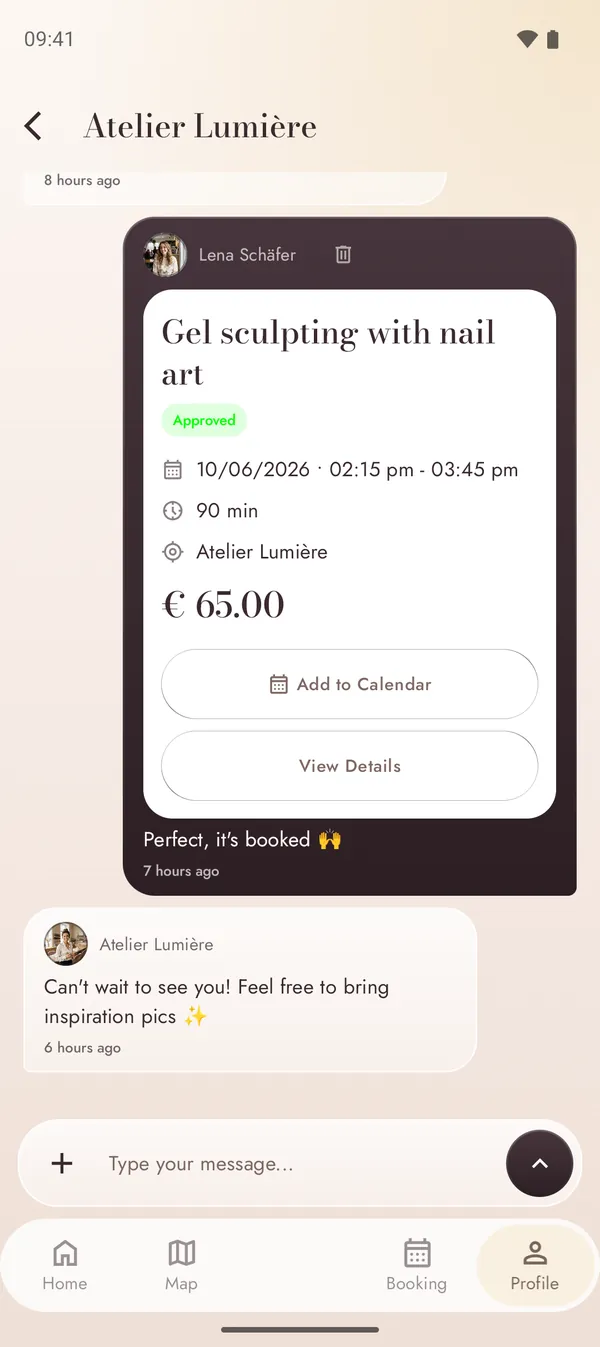
Send your artist a photo of the look you want, ask about the right shape or length and get your booking confirmation right in the conversation.

  • Direct chat with every studio
  • Share images from posts, saved designs or your AI designs
  • Push notifications for messages and booking updates
Chat with the nail artist including booking confirmation

Your appointments

Every appointment at a glance

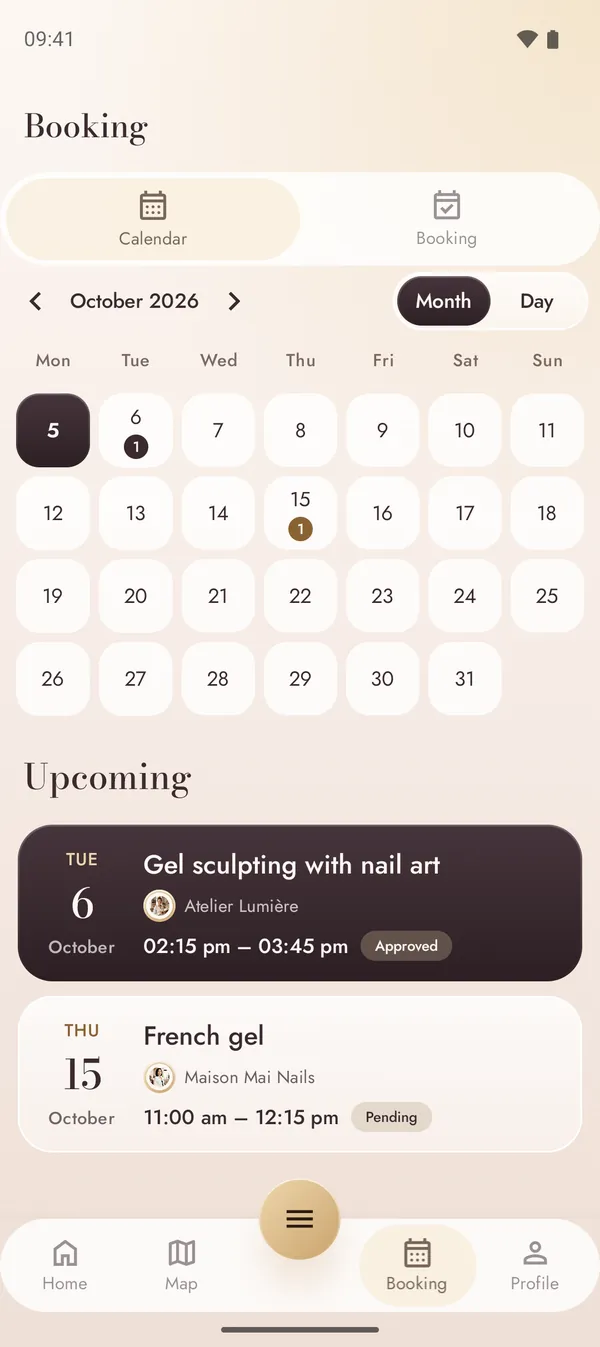
Your bookings land in a calendar with month and day view. Upcoming appointments show their status, so you always know whether a request is still pending or already approved.

  • Month and day view with upcoming appointments
  • Status at a glance: pending, approved, cancelled
  • All details – and cancelling – in the booking view
Calendar with upcoming appointments

Reviews

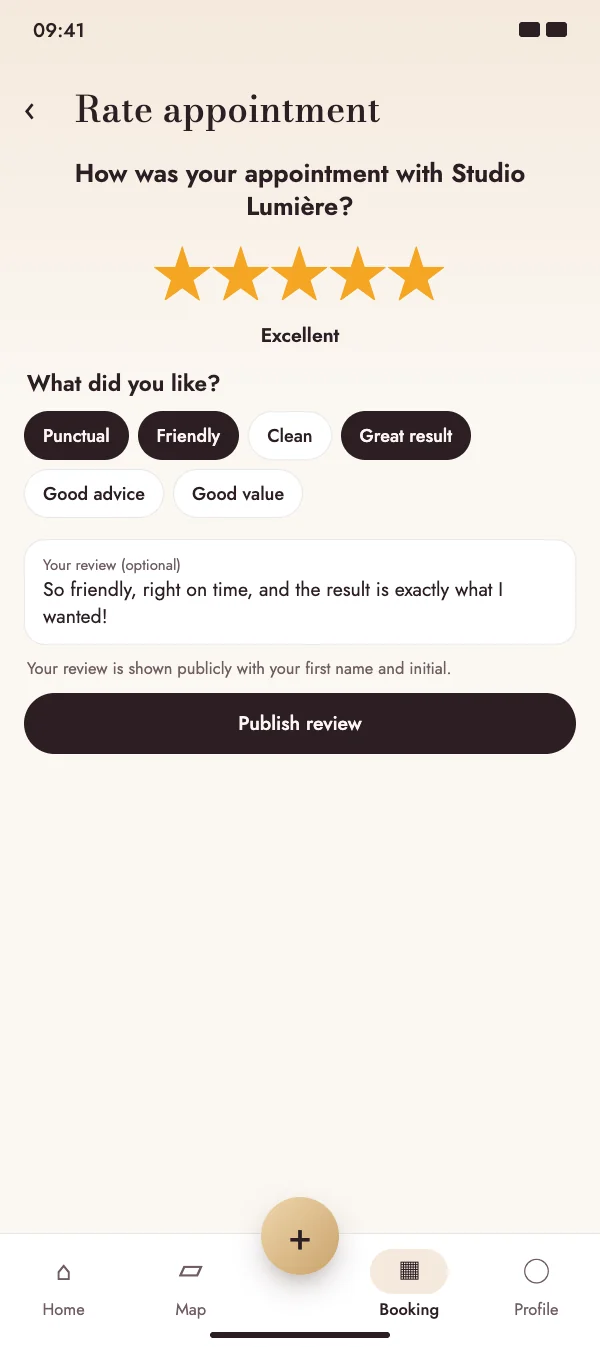
Genuine reviews from real appointments

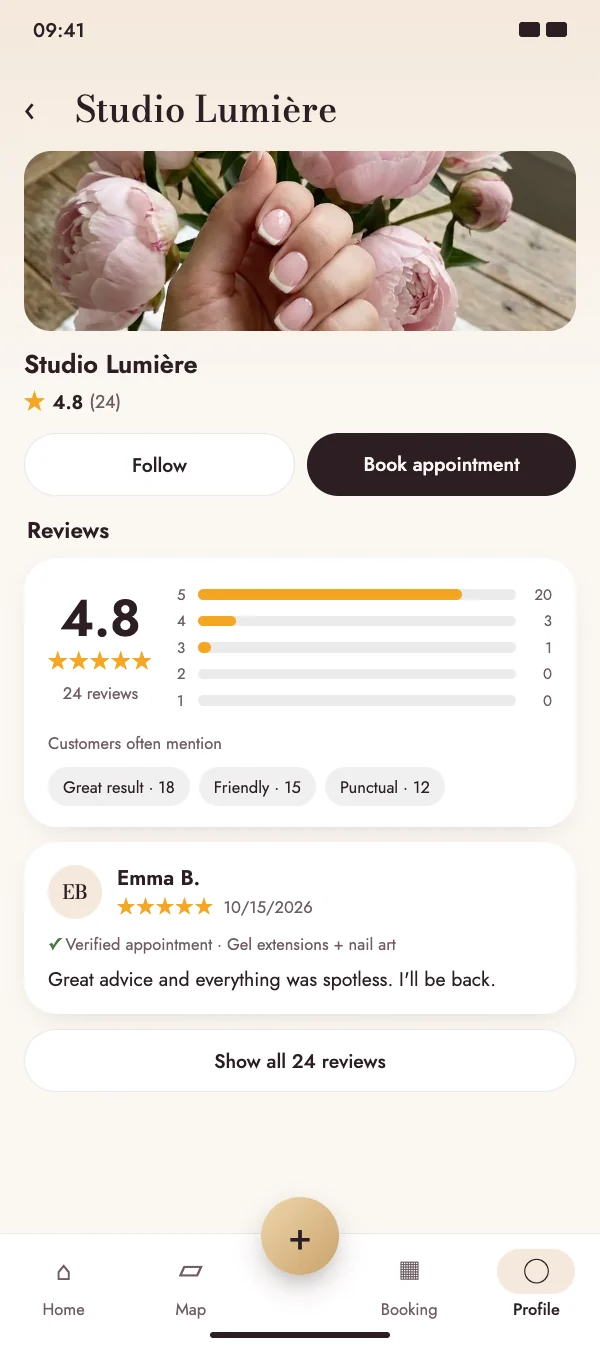
In NailMe, only people who actually had their appointment can leave a review. That makes the stars on a profile something you can trust – and gives pros honest feedback they can answer publicly.

  • Only confirmed appointments count – one review per booking
  • Stars on the profile, on the map and on the web
  • Pros reply publicly
More about reviews
Stars on the profile, on the map and on the web

For nail artists & salons

Your studio, booked online. 0% commission.

NailMe gives you everything you need to get booked – and to be found by new clients. Booking is free for nail artists: no booking fees, no commission, no contract.

  • Free online booking
  • No commission
  • Cancel anytime
New booking requestGel sculpting · Thu 10:30

Ready to take bookings in three steps

  1. 1

    Create your artist profile

    Switch your profile to an artist account and add your studio address, a cover photo, your bio and your Instagram or TikTok.

  2. 2

    Add services & time slots

    Create services with price and duration, sort them into categories and set your time slots, breaks and days off.

  3. 3

    Share your link

    Your profile gets its own link – nailme.app/profile/yourname – for your Instagram bio, WhatsApp status or Google Maps entry.

Everything included

Online booking 24/7

Clients book free slots at any time – even while you are working on a set of nails.

Bookings without the app

Your clients can also book in their phone's browser through your profile link – for example from your Instagram bio. Nobody has to install an app.

Approve or auto-accept

Review each request and approve or decline it – or let bookings be confirmed automatically.

Services & prices

Categories, prices, durations and descriptions – clear for every client before they book.

Time slots & breaks

Set your time slots per weekday, add breaks between appointments and block days off.

Manual appointments

Enter phone and walk-in appointments into the same calendar, so nothing gets double-booked.

Client management

Contact details, notes, visit history and statistics for every client – always at hand.

Team & salon

Invite other artists to your group, assign services to employees and let clients choose who they book.

More about team & insights

Reminders & waitlist

Automatic appointment reminders, a nudge when it's time to rebook, a waitlist for freed-up slots and recurring appointments as a series.

More about reminders

Client records & forms

Your own fields, notes and photos per appointment – plus forms and consent forms for the services that need them, with a signature if you want.

More about client records

Gift vouchers

Sell vouchers online on your profile, issue them in the studio and redeem them with the remaining balance.

More about gift vouchers

Social templates

Stories and posts for Instagram & co. from your profile, designs, reviews and free slots – with your booking link.

More about social templates

Set up in 1 minute

Snap your price list, upload a screenshot, speak or type – the AI creates services, prices, durations, opening hours and address. You check and apply.

AI writing help

Post text and hashtags from your photos, replies to reviews and chat messages, your profile text – you decide what gets sent.

From post to booking

Customers tap “I want this” on your post – the AI finds the matching service and the booking starts right away.

Services in 30 languages

Your services appear automatically in your customers’ language – perfect for guests from all over the world.

Speak instead of typing

Appointments, visit notes and daily reports: just say them – the AI fills everything in. Plus tips from your own booking numbers.

E-invoices & reminders

XRechnung and ZUGFeRD for authorities and companies, payment terms and reminders in three stages.

More about e-invoices and reminders

Team board & roles

Weekly plan with appointments and absences – plus roles such as foreman or accounting.

More about the team board and roles

Mobile service

Offer appointments at your client’s address – the travel time is calculated automatically.

Portfolio & reach

Your posts appear in the feed, in search and on the map – each with a Book button.

Chat & notifications

Talk to clients directly and get notified about every new request, cancellation and message.

Your own profile page

Your profile and posts are shared as links and appear as web pages that search engines can find.

AI for your consultations

Create ideas with AI and show your clients what’s possible – included in Pro.

More about the booking system

Compare

What does a booking platform really cost you?

Move the sliders to match your studio and compare typical platform models with NailMe.

Saved per year compared to a platform with 10% commission

€10,800

NailMe charges no booking fees and no commission.

NailMeFree · 0% commission
Booking softwareMonthly subscription
Marketplace with new-client fee30% on the first booking of new clients *
Commission platform10% on every booking

* Illustrative example values for typical pricing models (subscription, fee on new clients, commission per booking) – not the prices of a specific provider. Assumption: 30% of bookings are new clients from the marketplace. Actual costs depend on platform, region and plan. Booking on NailMe is free for professionals.

Invoices & deposits

No more empty chair for gel and acrylic

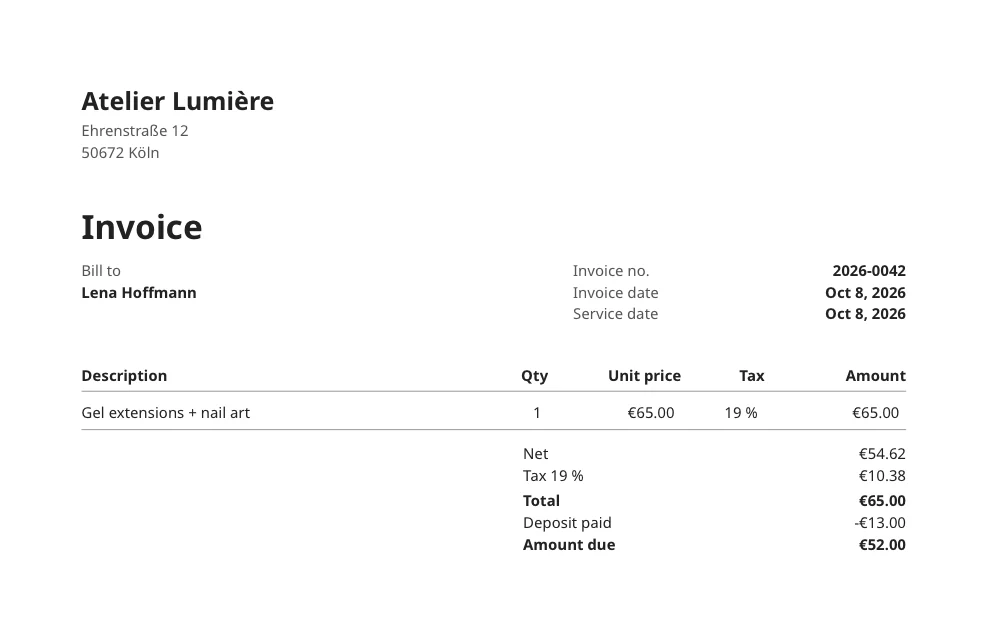
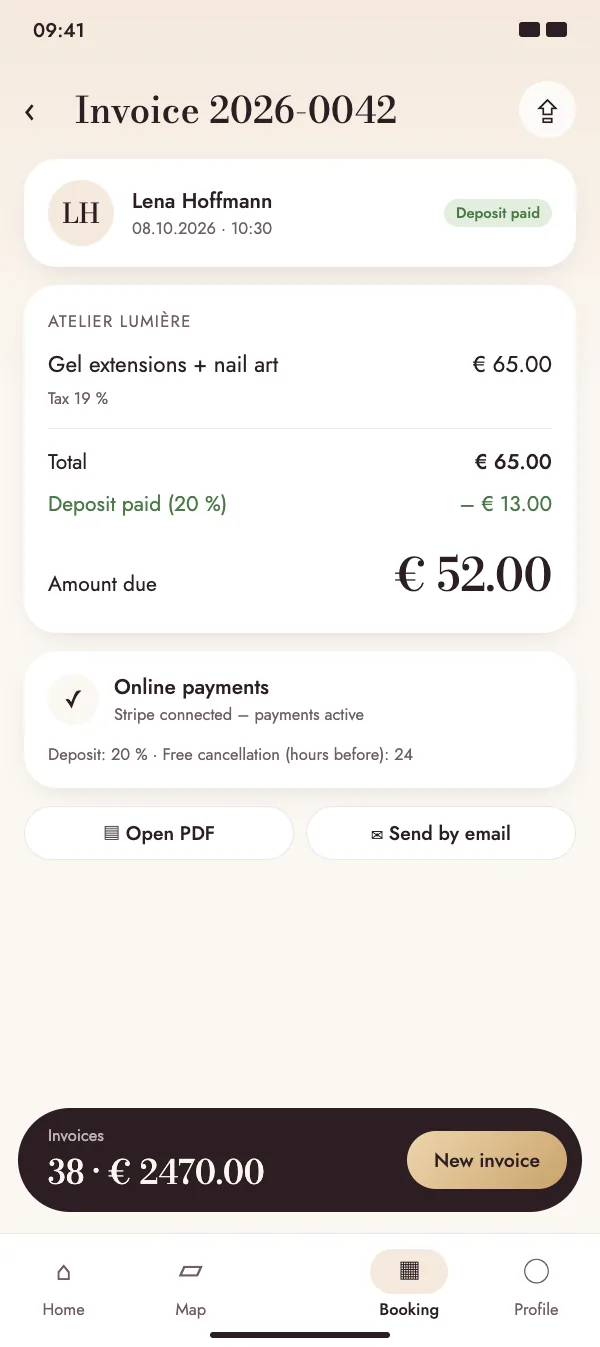
Long appointments like a full set or nail art hurt when someone doesn't show. Ask for a deposit at booking, paid straight into your Stripe account: cancel in time and it's refunded automatically, no-show and it's kept. Create the invoice afterwards with one tap.

Invoice with an online deposit already paid
  • Deposit as a percentage of the price, with your own free cancellation window
  • Invoices numbered automatically, as a PDF in your client's language
  • No platform fee – the money goes directly to you
More about invoices and deposits

Tax export

Ready for your tax return in one tap

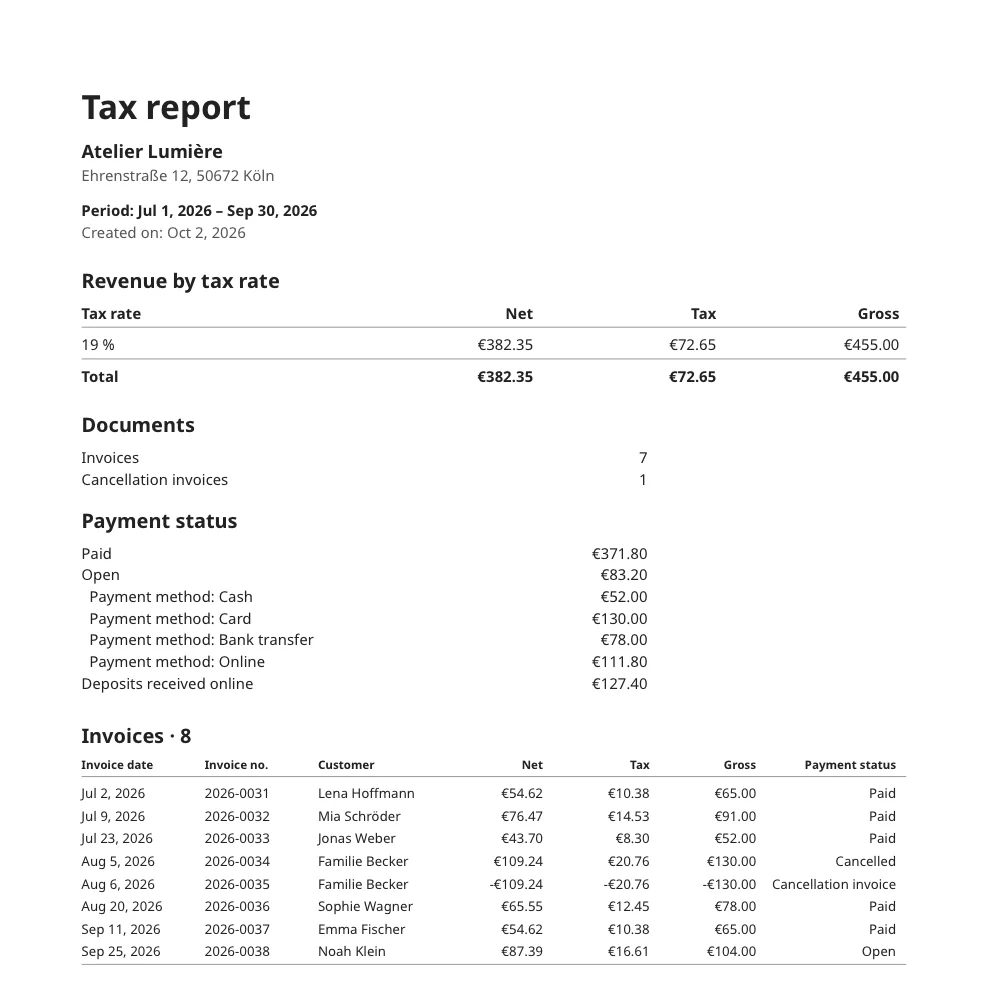
Choose a month, quarter or year and get one ZIP file with everything your accountant needs: a tax report with revenue per tax rate, the invoice list and all invoice PDFs.

  • Tax report as PDF, invoice list as Excel and CSV
  • All invoice PDFs of the period in one go – cancellations included
  • In Germany also as a DATEV posting batch (SKR03/SKR04)
More about the tax export
Tax report for a quarter
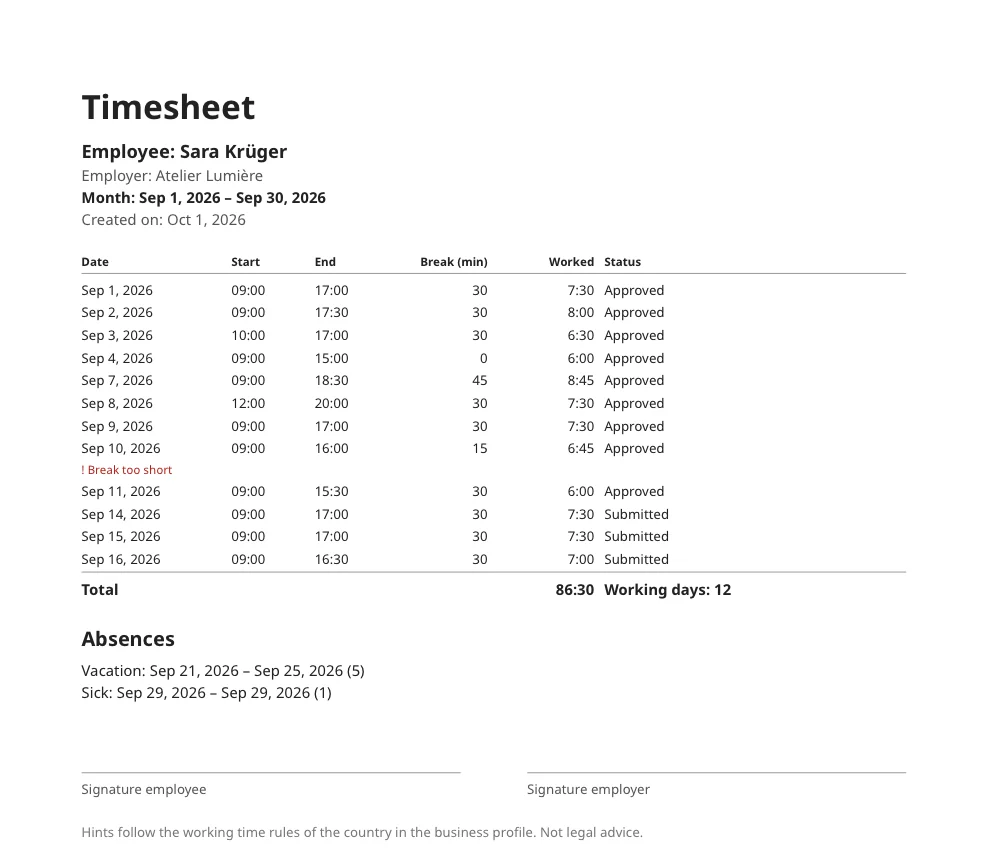
Timesheet for one month

Time tracking

Working hours without paperwork

Clock in and out with one tap, take times over from your appointments or add them later. As a studio with a team you approve your employees' times and get a finished timesheet every month.

  • Time clock with breaks, times from appointments, vacation and sick days
  • Approval in the team, corrections with reason and history
  • Monthly timesheet as PDF and CSV, with hints on breaks and rest periods
Learn more about time tracking

Pricing

Booking is free. Always.

Booking, calendar and client management are free – no commission. Pro unlocks business tools and AI, the team plan adds multiple accounts.

Free

For clients and nail artists

$0

forever · no commission

  • Feed, map, search and chat
  • Book appointments and manage them in your calendar
  • Artist profile with portfolio and services
  • Online booking, time slots and manual appointments
  • Client management
  • Appointment reminders, client records & social templates
  • AI setup & AI writing help

Group / Salon

For salons with several artists

$11

per month · excl. tax

  • Everything in Free and Pro
  • Combine several artist accounts in one salon
  • Assign services to employees
  • Clients choose their artist when booking
  • Invoices, online deposits, tax export & time tracking
  • Rebooking, waitlist, series, forms & gift vouchers

All features compared

Feature Free$0 Pro$5 Group / Salon$11
Booking & clients
Feed, map, search and chat
Book appointments and manage them in your calendar
Artist profile with portfolio and services
Online booking, time slots and manual appointments
On-site appointments with automatic travel time
Client management
No commission on bookings
Appointment reminders 24 h and 2 h before
Client records with your own fields and notes
Social templates for Instagram & co.
Automatic chat reply outside opening hours
Calendar sync with Google, Apple and Outlook
Import clients and services from a CSV file
Business tools
Invoices as PDF
Online deposits when booking
Tax export (PDF, CSV, Excel, DATEV)
Time tracking
Rebooking reminders and waitlist
Recurring appointments as a series
Forms with signature and photos in client records
Sell and redeem gift vouchers
Promotions like “Thursdays −10 %”
Loyalty stamp card
Stock with automatic deduction per service
Income & expenses with monthly result
E-invoices and payment reminders
Team time tracking with approval
Team board and roles
AI
AI design generator with text prompt
Preview designs on a photo of your hand
Monthly generation allowance
Save, post and share your designs
Team
Combine several artist accounts in one salon
Assign services to employees
Clients choose their artist when booking

Prices excl. tax. Subscriptions are purchased in the App Store or on Google Play, renew monthly and can be cancelled at any time. You pay for appointments directly at the studio.

FAQ

Questions & answers

Can’t find what you’re looking for? Write to us – we’re happy to help.

Contact support
Is NailMe free?

Yes. Discovering, chatting and booking is free for clients. Professionals can also create a profile, list their services and accept online bookings for free – without commission. Only Pro (business tools and AI) and the Group plan for teams are paid subscriptions.

Does NailMe take a commission on bookings?

No. NailMe charges no commission and no booking fees – neither for new clients nor for regulars. What your clients pay for a treatment goes entirely to you.

How do I pay for my appointment?

You pay directly at the studio, the way your artist offers it. The price and duration of every service are shown before you book.

Which nail shape suits me?

It depends on finger length, nail bed and daily life. Oval or almond make short fingers look longer; if you use your hands a lot, round or squoval works well. In NailMe you can try every shape on your own hand with AI before you book.

How often do gel or acrylic nails need a refill?

Usually every three to four weeks, once the nail has grown out. In NailMe, studios set per service when you get reminded – so the refill reminder comes by itself.

How does the AI nail design work?

Choose a style category and a nail shape and describe your idea in your own words. The AI creates unique designs in seconds. With the hand photo mode, you upload a photo of your hand and see the design on your own nails. Clients try the AI for free: 1 design without an account, 3 a month with an account. For professionals it is included in Pro and in the Group plan.

How do I become a nail artist on NailMe?

Download the app, sign up and switch your profile to an artist account. A short setup guides you through address, services and time slots. Then share your profile link – and you’re ready for your first booking.

Can I run a salon with several artists?

Yes. With the Group plan you invite other artists to your salon, assign services to employees and your clients choose who they want to book. The team board shows who works when, and you move appointments by drag and drop – your clients are informed automatically. Every team member uses their own account – free, or with their own Pro for the Pro tools.

Do my clients need the app?

No. With your profile link, clients can also book directly in the browser – they just sign in with Google or email. In the NailMe app they also get chat, reminders and their appointment overview.

Can I send my dream design to the artist before the appointment?

Yes. Save a design from the feed or your AI try-on and send it to your studio in the chat. That way the artist knows what you want before the appointment and can plan the time properly.

Get NailMe

Your next nails – already seen on your hand.

Download NailMe for free and discover nail art, AI designs and studios near you. Are you a nail artist? Set up your profile today and get your first online booking.

Free to download · iOS & Android